sandeepk

100daystooffload

In the previous blog post, we have discussed F() Expression, we will now explore more query expression in Django, to name few that we will discuss in this post are

  • Func() Expression
  • Subquery Expression
  • Aggregation () Expression

Func() Expression Func () Expression is the base of all the expressions and can be used to create your custom expression for the database level function.

# The table that we using for our query is the *Student* which keeps records of the students for the whole school.

from django.db.models import F, Func
student_obj = Student.objects.annotate(full_name=Func(F('first_name') + F('last_name'), function='UPPER')

# This will give a student object with a new field that is *full_name* of the student in upper case.

Subquery Expression Subquery are like nested condition in the query filter which helps you to make a complex query into a clean concise query. But you need to know the order of the sequence the query will be executed to use effectively. While using a Subquery you will also need to know about the OuterRef, which is like an F() Expression but points to the parent query value, let see both Subquery and OuterRef in action

# you are given a task to get the name of the student whose name starts with *S* and whose fees are due.

from django.db.models import OuterRef, Subquery
fee_objects = Fees.objects.filter(payment_due_gt=0)
student_obj = Student.objects.filter(name__startswith='S').filter(id__in=Subquery(fee_objects.values('student_id')))

# Get the lastest remarks for the students
remark = Remark.objects.filter(student_id=OuterRef('pk')).order_by('-created_at')
student_obj = Student.objects.annotate(newest_remark=Subquery(remark.values('remark_strl')[:1]))

Aggregation () Expression

Aggregation Expression is the Func Expression with GroupBy clause in the query filter.

# get the total student enrolled in the *Blind Faith* subject.

student_obj = Student.objects.filter(subject_name='blind_faith').annotate(total_count=Count('id'))

Note: All queries mentioned above in the code are not tested. So if you see any typo, a query that does not make sense, feel free to reach out to me at sandeepchoudhary1507[at]gmail[DOT]com.

Cheers!

#100DaysToOffload #django #python

While working from home one of the issue I faced that my laptop battery charger adapter is always remain plugged in almost all the time, due to which I have to replace my laptop battery. To deal with the problem I have now written a script to notify me about the laptop battery charging level if it goes above 85 % and below 20%.

#! /bin/bash                                                                                                                                          

while true
do

    battery_level=`acpi -b | grep -o '[0-9]*' | sed -n  2p`
    ac_power=`cat /sys/class/power_supply/AC/online`

    #If above command raise an error " No such file or directory" try the below command.
    #ac_power=`cat /sys/class/power_supply/ACAD/online`
    if [ $ac_power -gt 0 ]; then
        if [ $battery_level -ge 85 ]; then
            notify-send "Battery Full" "Level: ${battery_level}%"
        fi
    else
        if [ $battery_level -le 20 ]; then
            notify-send --urgency=CRITICAL "Battery Low" "Level: ${battery_level}%"
        fi
    fi
    sleep 120

done

The important commands which I want to break down to explain actually what they are doing.

  • First is acpi which tell us about the battery information and other ACPI information
  • grep command is used to extract the integer value from the acpi command
  • sed is used to get the second value from the grep result.
>> acpi -b
Battery 0: Discharging, 54%, 02:03:37 remaining
>>acpi -b | grep -o '[0-9]*'
0
54
02
04
41
>>acpi -b | grep -o '[0-9]*' | sed -n  2p
54
  • After that, we check that the charger is plugged in or not, based on that we check that the battery level does not exceed the described limit, if so is the case send the notification.
  • Then we check for the battery low indication which sends the notification if the battery level less than 20 %.
  • These condition is put in a continuous loop to check after a sleep time of 120s.

To make this script run automatically you have to assign the execution permission and specifies the execution command in the ~/.profile and reboot the system.

>> sudo chmod +x /path/to/battery-notification.sh

you can find my notes on shell commands here

thanks shrini for pointing out issue for Ubuntu 20 in lineac_power=`cat /sys/class/power_supply/AC/online` :) Cheers!

#100DaysToOffload #automation #scripts

What is the F() Expression? First let me explain to you what are Query Expressions are, these expressions let you use value or computation to be used in the update, create and filters, order by, annotation, aggregation. F() object represent the value of the model fields or annotated columns. It lets you help to not load the value of the field into the python memory rather directly handles in the Database query.

How to use the F() Expression? To use the F expression you have to import them from the from django.db.models import F and have to pass the name of the field or annotated column as argument, and it will return the value of the field from the database, without letting know the python any value. Let some example.

from django.db.models import F

# Documents is the table which have the details of the document submitted by user from the registrey portal for GYM membership

# We need update the count of the document submitted by the user with pk=10091

# without using F Expression

document = Documents.objects.get(user_id=10091)
document.document_counts += 1
document.save()

# Using F expression
document = Documents.objects.get(user_id=10091)
document.document_counts = F('document_counts') + 1
document.save()

Benefits of the F() Expression.

  • With the help of F expression we can make are query clean and concise.
    from django.db.models import F
  document = Documents.objects.get(user_id=10091)
  document.update(document_counts=F('document_counts') + 1)

   #Here we also have achieved some performance advantage
    #1. All the work is done at database level, rather than throwing the value from the database in the python memory to do the computation.
    #2. Save queries hit on the database.
  • F Expression can save you from the race condition. Consider a scenario where multiple user access your database and when bother user access the Document object for the user 10091, the count value is two, when user updates the value and save it and other user does the same the value will be saved as three not Four because when both user fetches the value its two.

  # user A fetch the document object, and value of document_counts is two.
  document = Documents.objects.get(user_id=10091)
  document.document_counts += 1
  document.save()
  # after the operation value of document_counts is three

  # Code running prallerly, User B also fetch the object, and value of document_counts is two.
  document = Documents.objects.get(user_id=10091)
  document.document_counts  += 1
  document.save()
  # after the operation value of document_counts is three

  # But actually value should be Four, but this is not the case using F expression here will save use from this race condition.
  • F Expression are persistent, which means the query persist after the save operation, so you have to use the refreshfromdb to avoid the persistence.
  document = Documents.objects.get(user_id=10091)
  document.document_counts = F('document_counts') + 1
  document.save()

  document.document_validation = 0
  document.save()

  # This will increase the value of *document_counts* by two rather then one as the query presists and calling save will trigger the increment again.

  • More example of F Expression in action with filter, annotate query.
from django.db.models import F

# annotation example
annotate_document = Document.objects.filter(created_by=F('created_by_first_name') + F('created_by_last_name')


# filter example
filter_document = Documents.objects.filter(total_documents_count__gt=F('valid_documents_count'))

That's all about the F Expression, it is pretty handy and helps you improve the performance, by reducing value loading in the memory and query hit optimization, but you have to keep an eye over the persistent issue, which I assume will not be the case if you are writing your code in structured way.

Cheers!

#100DaysToOffload #django #python

Journaling is a great way to keep track of your progress and emotional state, using the same journaling principle in managing your finance can be of great help to see how money flow in & out of your life :).

So, here we will explore how to journal in Emacs or any editor of your choice with the help of the tool ledger.

Before starting, let's get familiar with the basic terminologies.

  • Assets – It's the money that you have.
  • Liabilities – It's the money that you own, or you can say Debt.

Ledger is the double-entry accounting software, which means that you have to mention the flow in of the money[where from it comes like Saving account, Credit Card] and flows out of the money[expenditure, Investment, shopping] and all these entries should balance out each other and result should be zero if it's not the case there is an issue in your entries. The best part of the ledger software is that it allows you to manage your data in a simple text file and don't alter your data, and you have all your data with you.

So, Ledger read the simple text file and generate all kinds of the report that you need. Emacs comes in the picture to manage these text file and give a solid way to manage these file with org-mode also, that we will discuss some other time.

Now get ready to set up the journal system.

Installing the Tools

  • Download the Ledger on your system based on your OS from here — for the lazy ones on Ubuntu OS, you can follow the steps given below.
$ sudo add-apt-repository ppa:mbudde/ledger
$ sudo apt-get update
$ sudo apt-get install ledger
  • Open your Emacs editor and then follow these steps.

    • Press Alt-X package-install [Enter Key]
    • Type ledger-mode [Enter Key], this will install the ledger-mode package
    • Open your Emacs config file and paste this snippet. We are telling the ledger-mode to activate for the file extension of .dat file.

      (use-package ledger-mode
           :ensure t
           :init
           (setq ledger-clear-whole-transactions 1)
      
           :mode "\\.dat\\'")
      

Ledger Mode in Action

  • Create a file with the extension .dat and open it in Emacs.
  • Press Ctrl-C Ctrl-A to enter an entry in the file.
    • This will ask for the date for the entry, afterward press enter.
    • Give a nice heading to your Ledger entry and add your expense.

Ledger entry example – It's up to you how you want to maintain your journal, Some entries example to sort out your expenses.
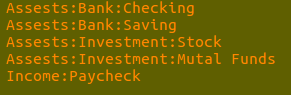
Ledger entry example – You can also plan your budget in the ledger and can automate the transaction, if you are geeky enough you can write a code to read the spreadsheet shared by your bank to populate the ledger. – Ctrl-C Ctrl-O Ctrl-R for report generation, you can find more about reports here

#100DaysToOffload #financial-freedom #emacs